Your first project
You will make a facade of 20 × 12 m, divided into panels of 1 m, with a vertical sun fin in each panel. The fins near a point turn open; the ones far from it stay closed. Seven nodes, no formulas.
Before you start: two gestures
Section titled “Before you start: two gestures”- Add a node: double-click on an empty spot of the canvas, or press Tab. Type its name and press Enter.
- Connect two nodes: drag from the small circle on the right of a card (what the node gives) to an input of another card.
Step by step
Section titled “Step by step”-
The facade. Add a Rectangle. In its card, write width
20, height12and choose plane: elevation. A rectangle standing up appears in the view. If you do not see it, turn on the eye of the card. -
The panels. Add a Grid and connect the Rectangle to its input rectangle. Write cell width
1and cell height1. The cable now readsrow 12 × column 20 = 240: 240 panels. -
The centre of each panel. Add a Centre and connect the Grid to its input geometry. You get 240 points, one in the middle of each panel.
-
The point that attracts. Add a Point with x
6, y0and z7: a spot on the facade, 6 m from the left and 7 m up. -
An angle for each panel. Add an Attractor. Connect the Centre to where and the Point to attractors. Write reach
8, near90and far0. Each panel now has an angle: 90° right next to the point, 0° at 8 m or farther. -
The fin. Add a Box with width
0.4, depth0.05and height1: a thin vertical blade. -
A fin in every panel. Add a Place. Connect the Box to geometry, the Centre to at and the Attractor to rotation. 240 fins appear: open around the point, closed far from it.
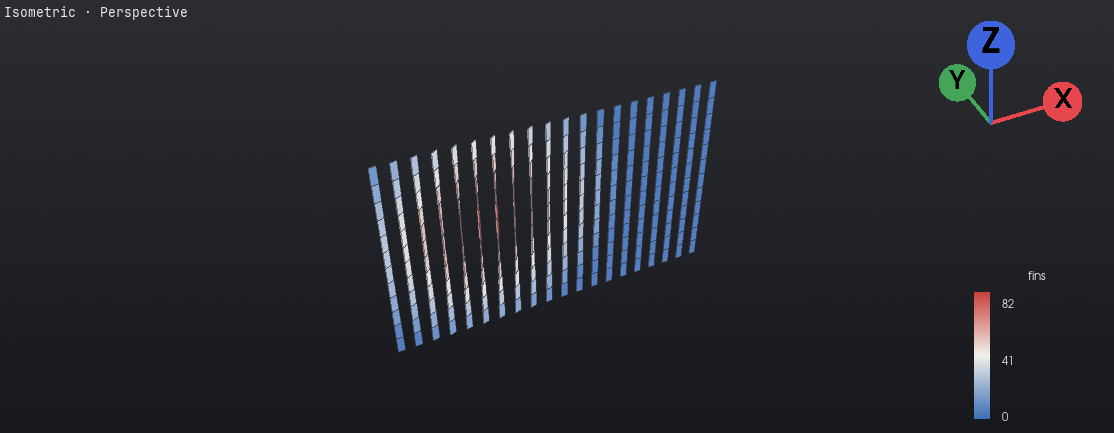
Here the fins are painted by their angle (Colour → by a value), to see which ones open.
Now play with it
Section titled “Now play with it”This is where parametric design pays off. Change any number and the whole facade answers:
- Move the Point: change its x or z and watch the opening travel across the facade.
- Change the reach of the Attractor: a small reach opens only a few fins, a large one opens most of them.
- Swap near and far: the fins close around the point and open everywhere else.
- Change the cell width of the Grid to
0.5: twice as many fins, without touching anything else.
- See only what matters. Turn off the eye of the Rectangle, the Grid and the Centre, so the view shows only the fins.
- Fins in front of the facade. The fins sit on the plane of the facade. To bring them 30 cm forward, put a
Move between the Centre and the Place with vector
0; -0.3; 0. - Save your project with File → Save. Tensela projects end in
.tela.
What you just learnt
Section titled “What you just learnt”- A design is a chain of small steps, each one a node. Nodes and cables
- The Grid made a list of 240 panels, and every node after it worked on all 240 at once. Lists with names
- The Attractor made each panel different on purpose. Conditions and attractors