Nodes and cables
What for
Section titled “What for”To describe how your design is made instead of drawing the result. Once the steps are there, you change any of them, the width of the facade, the number of floors, the angle of a fin, and everything that depends on it is calculated again.
An algorithm is a recipe
Section titled “An algorithm is a recipe”A recipe has ingredients, steps in an order, and a dish at the end. A Tensela project is the same:
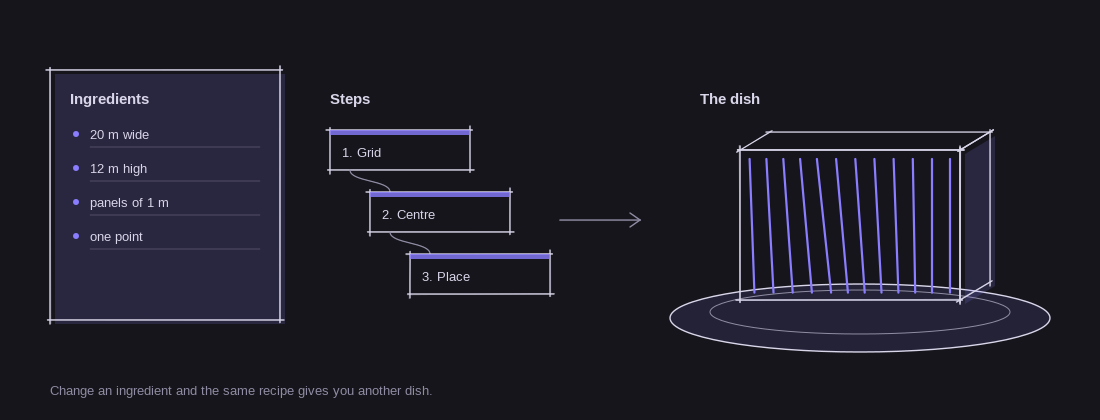
| In a recipe | In Tensela | In the facade with sun fins |
|---|---|---|
| The ingredients | the values you type | 20 m wide, 12 m high, panels of 1 m |
| The steps | the nodes | a rectangle, a grid, a fin in each panel |
| The order of the steps | the cables | the grid needs the rectangle first |
| The dish | the form in the 3D view | the facade with its 240 fins |
Change an ingredient, a taller facade or narrower panels, and the same recipe gives you another dish. You do not draw the facade again: you change the recipe. And like a recipe, a project can be shared: whoever opens it gets the same steps and can try their own ingredients. That is why the projects of this manual are called recipes.
- Add a node: double-click on an empty spot of the canvas, or press Tab, and type. You can type the name of the node (Prism) or what you want to make (volume, building): the search finds it either way.
- Connect: drag from the small circle on the right of a card, which is what the node gives, to an input of another card.
- Give values: each input of a card can be typed (a number, a point, a list) or brought by a cable from another node. When a cable arrives, the field takes its value from it.
What it does
Section titled “What it does”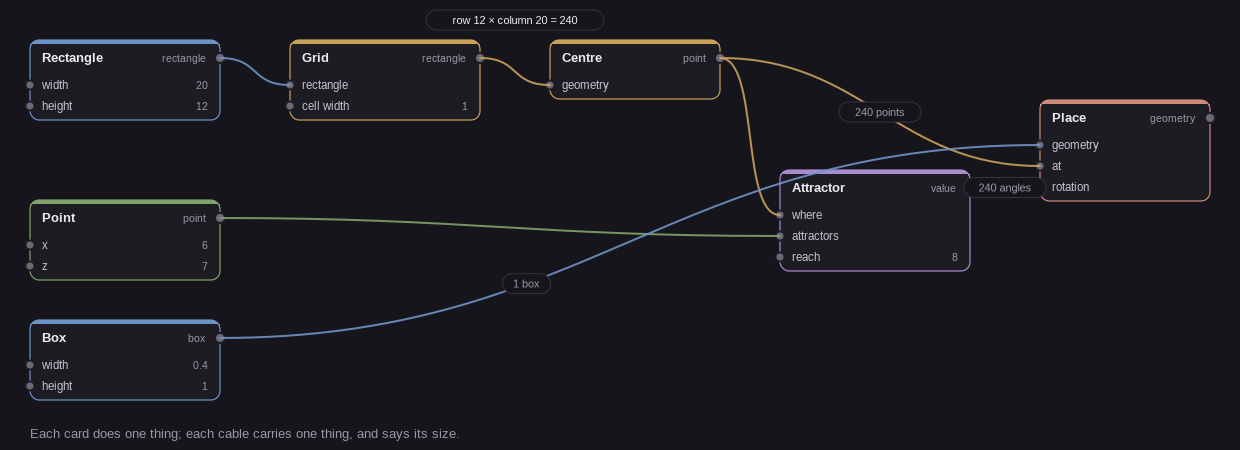
- A cable carries one thing from one node to another: a rectangle, 240 points, a list of angles. On the cable
you read its size, for example
row 12 × column 20 = 240. - Change a value and everything after it updates, in order, in the view.
- Each family of nodes has its colour, the same on the strip of the card, on its icon and in the search:
| Family | Colour | Examples |
|---|---|---|
| Values | green | Number, Series, Formula, Yes or no |
| Shapes | blue | Point, Box, Prism, Rectangle |
| Curves | teal | Circle, Arc, NURBS Curve, Line |
| Surfaces | petrol blue | Loft, Extrude, Ribs, Surface from points |
| Divide | ochre | Grid, Faces, Vertices, Points on curve |
| Measure | violet | Area, Distance, Attractor, Filter |
| Transform | terracotta | Move, Rotate, Scale, Place |
- A card with a problem says it in words: what is missing or what does not fit, and usually how to fix it.
- Numbers: decimals can be written with a point or a comma,
3.5or3,5. Several values are always separated by a semicolon:1.5; 2; 3. A point is written0 0 0,8 0 2.5or(0; 0; 1.5). - Inside a card field, Tab jumps to the next value and Delete erases letters, not the node.