
How a project is calculated
What happens between the moment you change a number and the moment the 3D view shows the new form. For whoever wants to know; you do not need it to design.
A project is a graph
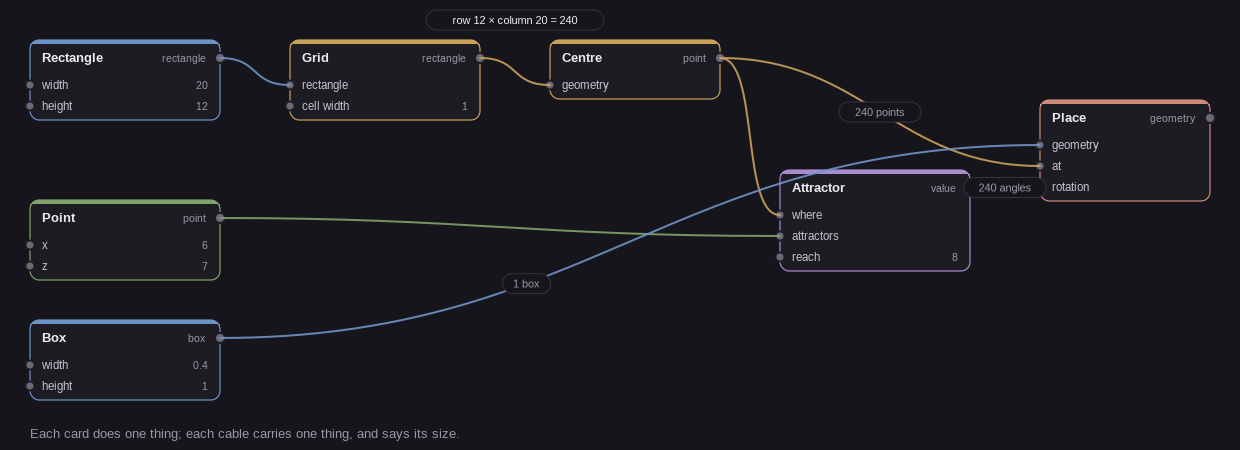
Section titled “A project is a graph”A Tensela project is a list of nodes, each with its inputs: a fixed value, or a connection to another node. The
.tela file says exactly that, in plain text (JSON). This is the whole of Your first project:
{ "nodes": { "facade": {"type": "Rectangle", "width": 20, "height": 12, "plane": "elevation"}, "panels": {"type": "Grid", "rectangle": {"node": "facade"}, "cell_width": 1, "cell_height": 1}, "centres": {"type": "Centre", "geometry": {"node": "panels"}}, "point": {"type": "Point", "x": 6, "z": 7}, "attractor": {"type": "Attractor", "where": {"node": "centres"}, "attractors": {"node": "point"}, "reach": 8, "near": 90, "far": 0}, "fin": {"type": "Box", "width": 0.4, "depth": 0.05, "height": 1.0}, "fins": {"type": "Place", "geometry": {"node": "fin"}, "at": {"node": "centres"}, "rotation": {"node": "attractor"}} }}{"node": "facade"} is a cable. The kinds of nodes and their inputs are always written in English in the file, so
a project made with Tensela in Spanish opens the same in any language. Since it is text, a project can be read,
compared between two versions, or kept in a version control system like any other text file.
Calculated when asked, kept until it changes
Section titled “Calculated when asked, kept until it changes”Tensela does not calculate the whole project each time. It works the other way round:
- When the view needs the result of a node, Tensela asks for its inputs first, and those ask for theirs, back to the values you typed.
- Each node calculates once, and keeps its result.
- When you change an input, Tensela clears the kept result of that node and of everything that depends on it, and nothing else.
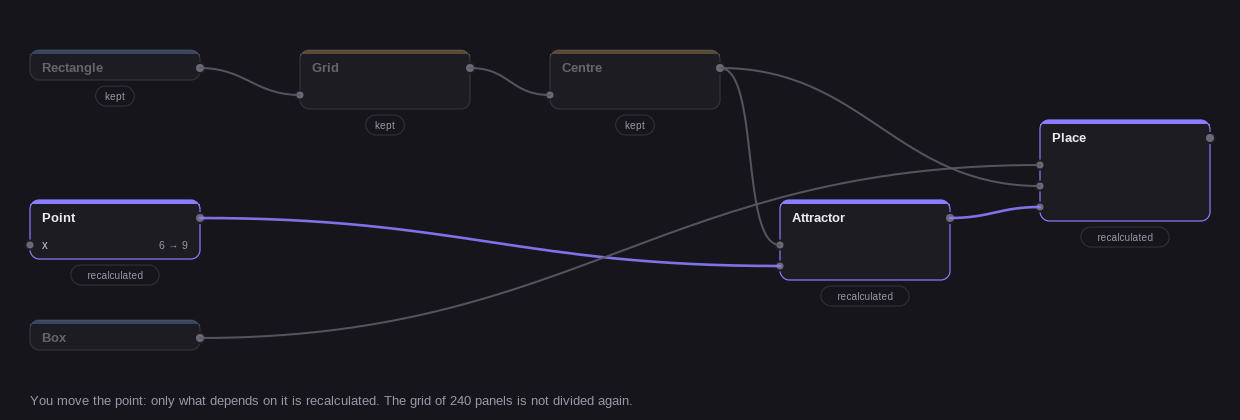
So when you drag the attractor point, the grid of 240 panels is not divided again: only the point, the Attractor and the Place are recalculated. That is why a large project still answers while you drag a slider.
def change(node, input, value):    node.inputs[input] = value    clear(node)                       # this node and everything after it
def clear(node):    node.result = None    for after in nodes_that_use(node):        clear(after)
def result(node):    if node.result is None:           # not kept: calculate it from its inputs        inputs = {name: result(v) if is_node(v) else v for name, v in node.inputs.items()}        node.result = node.kind.function(**inputs)    return node.result
No loops
Section titled “No loops”Because a node is calculated from its inputs, a node cannot depend on itself. If a cable would close a circle, Tensela does not connect it and says so: Connecting “a” to “b” would make a loop: “b” already comes before “a”. To repeat a step on its own result, use a group that repeats.
The window keeps responding
Section titled “The window keeps responding”If a calculation takes more than about a tenth of a second, it goes on in the background: the 3D view keeps the last result, Computing… Stop appears, and you can keep working. If you change something in the meantime, that calculation is dropped (it no longer serves) and a new one starts with the new values. Stop drops it and goes back to what was shown.
Errors in words
Section titled “Errors in words”When a node cannot calculate, its card says why, in words: what is missing, what does not fit, and usually how to fix it. The error stays in that node and in the ones that depend on it; the rest of the project keeps working.
Limits that protect your work
Section titled “Limits that protect your work”- 5 million elements per result at most: above that, a notice before calculating. It is almost always a crossing of levels that should have been a pairing.
- 50 000 pieces in the view: above that, the view asks before drawing (Show them or Turn off its eye).
- The Code node is made not to reach the network: Tensela checks the code before running it, and stops it if it tries to open files, reach the network or start other programs. It runs your Python with only a list of allowed names, and stops it after 10 seconds.
Groups
Section titled “Groups”A group is a graph inside a node. Inside, it calculates like any project; outside, it is one card with its inputs and its output. A group that repeats runs its graph several times, passing its result back in, a fixed number of times.