
Groups
What for
Section titled “What for”- Tidy up: a long chain becomes one card with a clear name, like a chapter.
- Make your own node: a group is a new kind of node, a sun fin or a panel with frame, that you can use as many times as you want.
- Repeat a step: a step whose result goes back in, several times (a fractal, a curve that subdivides).
- Select the nodes, dragging a rectangle or with Ctrl + click, and press Ctrl + G.
- Give the group a name: that name is the new kind of node.
- Double-click the card of the group to go in; Leave group goes back up. Ungroup (Ctrl + Shift + G) turns the nodes loose again.
What it does
Section titled “What it does”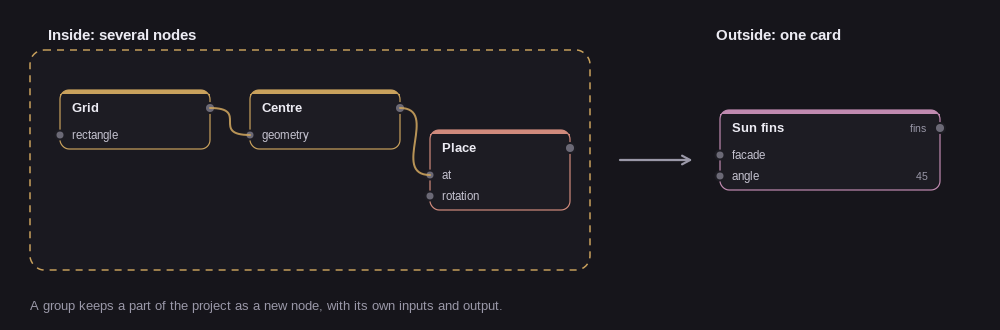
- What enters: the cables that reached the nodes from outside become the inputs of the group.
- What leaves: the card of the group gives one result. If two of the nodes are used outside, a Group result card appears next to it with the name of the node it replaces. The group is calculated only once for both.
- Change it once, change it everywhere: what you change inside a group applies to every node of that kind.
- Groups inside groups: inside a group you can group, ungroup and go into another group, as deep as you want.
- Eyes inside: inside a group, turning on the eye of a node shows what it calculates with what reaches that card; the outside fades.
Repeat
Section titled “Repeat”A group can repeat itself: write repeat 3 on its card. The first time it receives what is connected; after
that, its own result.
- back into: which input the result goes back in through (empty: the first one). The other inputs receive the same thing at every step.
- keep: only the last step, or all the steps along a new level, step, with the start first (step 0).
- An input of the group named
stepreceives the number of each step: 0, 1, 2…
Tip: what comes out has to be able to go back in where the start went in: a line for a line. If not, a notice says at which step it failed.