
Lists in Tensela, Grasshopper and Dynamo
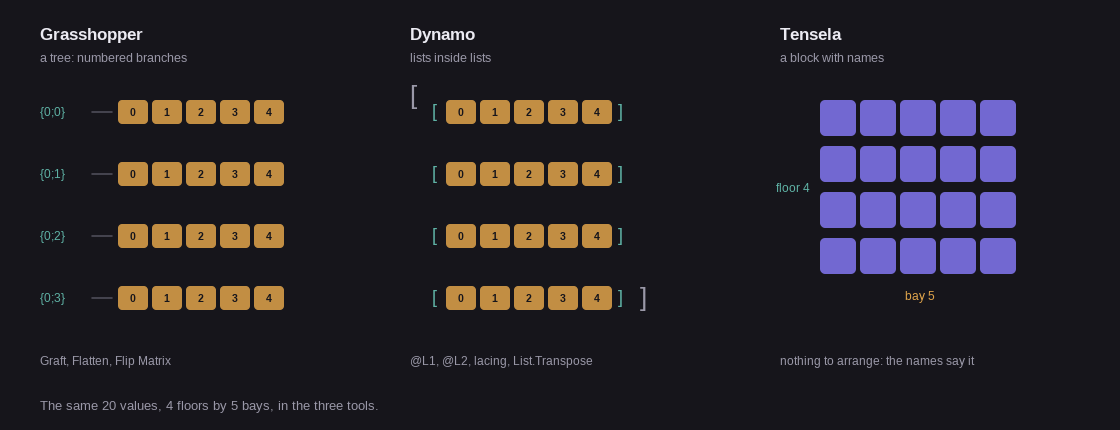
If you come from Grasshopper or Dynamo, the biggest change is how lists are kept and combined. This page puts the three side by side, with the same 20 values: 4 floors by 5 bays.
Grasshopper: a tree of numbered branches
Section titled “Grasshopper: a tree of numbered branches”In Grasshopper, data are kept in a tree. Each branch has a path of numbers, such as {0;2}, and holds a
list. The 4 floors are 4 branches, each with a list of 5 bays.
- When a component receives two inputs, it matches them item by item and, by default, repeats the last item of the shorter list (longest list).
- To combine every floor with every bay, you change the structure first: Graft one list (each item to its own branch), or use Cross Reference.
- Flatten, Graft, Simplify, Flip Matrix and Shift Paths exist to reshape the tree before combining.
It is very powerful and very explicit: you control the shape of the tree, step by step.
Dynamo: lists inside lists
Section titled “Dynamo: lists inside lists”In Dynamo, data are nested lists: a list of 4 floors, each a list of 5 bays.
- How two lists combine is chosen per node with its lacing: shortest, longest or cross product.
- Replication guides (
<1>,<2>) and list levels (@L1,@L2) say which level of the nested lists a node works on. - List.Transpose swaps the inside and the outside.
Tensela: a block with names
Section titled “Tensela: a block with names”In Tensela, the 20 values are one block, floor 4 × bay 5. The names decide how it combines: the same name
pairs, different names cross. There is no tree to reshape and no lacing to choose; the rule is always the same.
How it works inside: Named lists, inside.
The same tasks in the three
Section titled “The same tasks in the three”| Task | Grasshopper | Dynamo | Tensela |
|---|---|---|---|
| Every floor with every bay | Graft one input, or Cross Reference | lacing cross product, or <1> <2> |
different names: by itself |
| Each floor with its own value | the same tree structure on both sides | lacing shortest or longest | the same name: by itself |
| Turn only the floors upside down | Flip Matrix, Reverse List, Flip Matrix | List.Reverse at the right level (@L2) |
Reorder, level floor |
| Swap floors and bays | Flip Matrix | List.Transpose | nothing to do: levels have no order |
| The total of each floor | Mass Addition on each branch | Math.Sum at the right level | Summarise, sum along bay |
| Two lists that do not fit | the last item of the shorter one is repeated | depends on the lacing | a notice with the two sizes |
What you gain, and what changes
Section titled “What you gain, and what changes”- You gain: the cable says what it carries (
floor 4 × bay 5), the same rule works in every node, and an operation on a level says which one by its name. A mistake in sizes gives a notice with both sizes. - What changes: levels have no position, so there is no the second level: you name it. Irregular data, such as more panels at the bottom of a tower than at the top, are kept as levels of variable size, and elements taken out by a filter leave holes, so the grid still reads the same.
Rhino and Grasshopper are trademarks of Robert McNeel & Associates. Dynamo and Revit are trademarks of Autodesk. Tensela is not associated with them.